Context Switching
Exploring how AI interfaces can support re-entry, memory, and momentum across interrupted work
Team Members


Holly Zhu

Jason Park

Valerie Cana

Hanara Nam

Holly Zhu
Yukti Poddar
The Problem
Context Loss in Long-Running AI Work
Most generative AI tools rely on a continuous, linear chat. This model works well for short, single-session interactions, but it breaks down as conversations stretch across hours, days, or weeks.
When users return to an ongoing conversation, they often struggle to reorient. Important decisions, partial outputs, uploaded files, and reasoning steps are buried deep in the transcript. To recover context, users are forced to scroll, skim, and mentally reconstruct what they were doing and why.
This friction becomes especially costly for frequent users who treat AI as an ongoing workspace rather than a one-off assistant. Whether planning a trip, iterating on ideas, writing code, or conducting research, the information is technically still there—but resuming work often requires more cognitive effort than the task itself.
Academic & Secondary Research
Prior HCI research shows that people working on complex tasks rarely move in a straight line. Instead, they explore alternatives, revisit earlier decisions, and recombine ideas across time.
The GEM-NI system (Zaman et al., CHI 2015) highlights how designers naturally work across evolving states. Without structural support, they waste cognitive effort remembering what they did, where things live, and how ideas relate. Tools that surface summaries, clusters, and history dramatically reduce this burden by externalizing memory.
We saw the same pattern in long AI conversations. Returning users are not just trying to remember content. They are trying to:
- Reestablish where they left off in a workflow
- Reconstruct their original intent
- Reconnect threads scattered across messages or even across chats
GEM-NI’s principles—summaries, surfaced history, clustering, and recombination—directly informed the Re-Entry Panel’s approach to summaries, topics, search, and related chats.
From Framing to Exploration
Bringing together insights from research helped us land on a clear design question. From there, we moved straight into visual thinking. We used structured sketching to explore multiple directions before narrowing, rather than locking into one idea too early.
How might we help people quickly re-enter an AI conversation
without losing context or momentum?
Insight 1
Structure Helps Until It Becomes Overwhelming
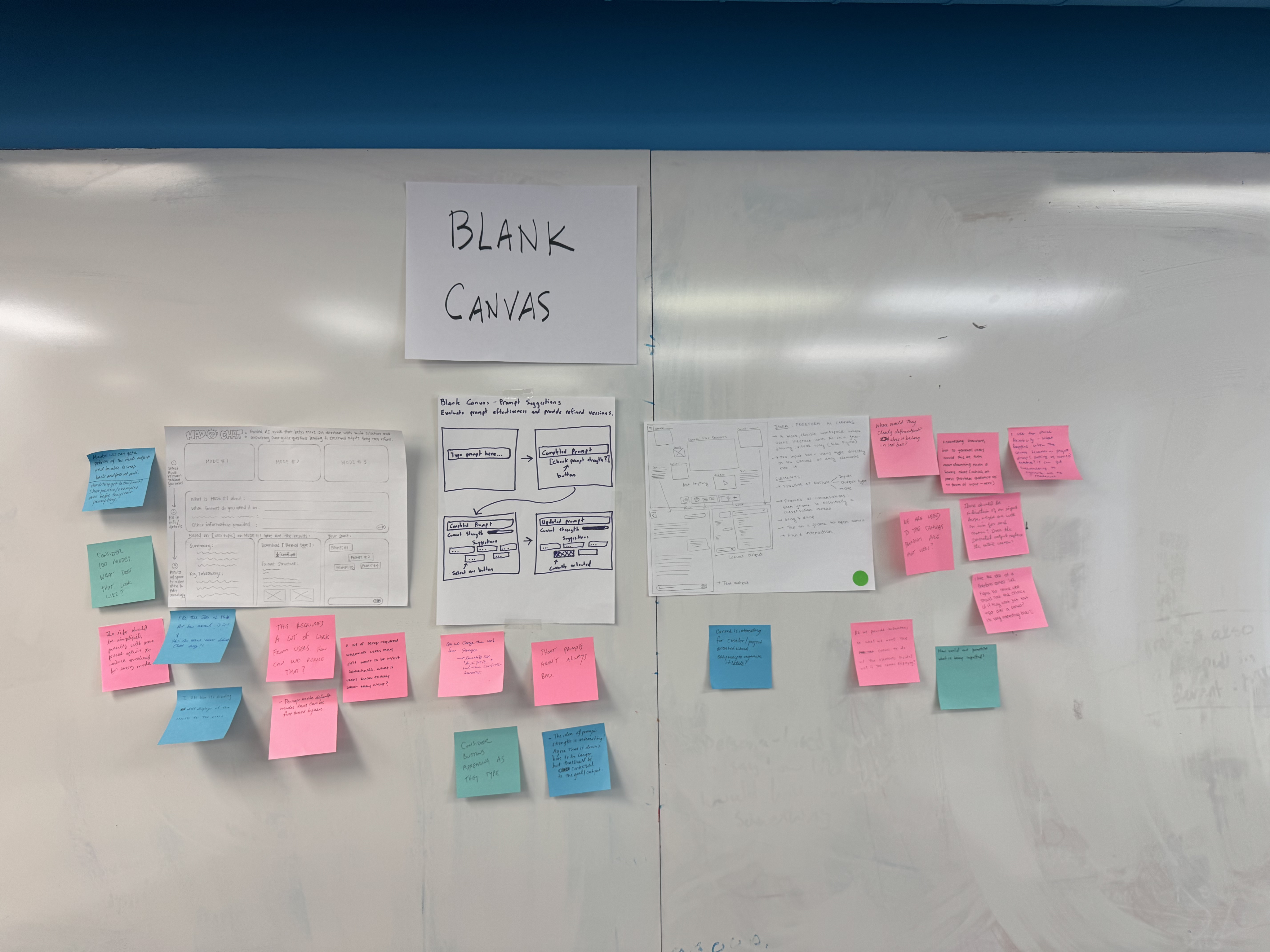
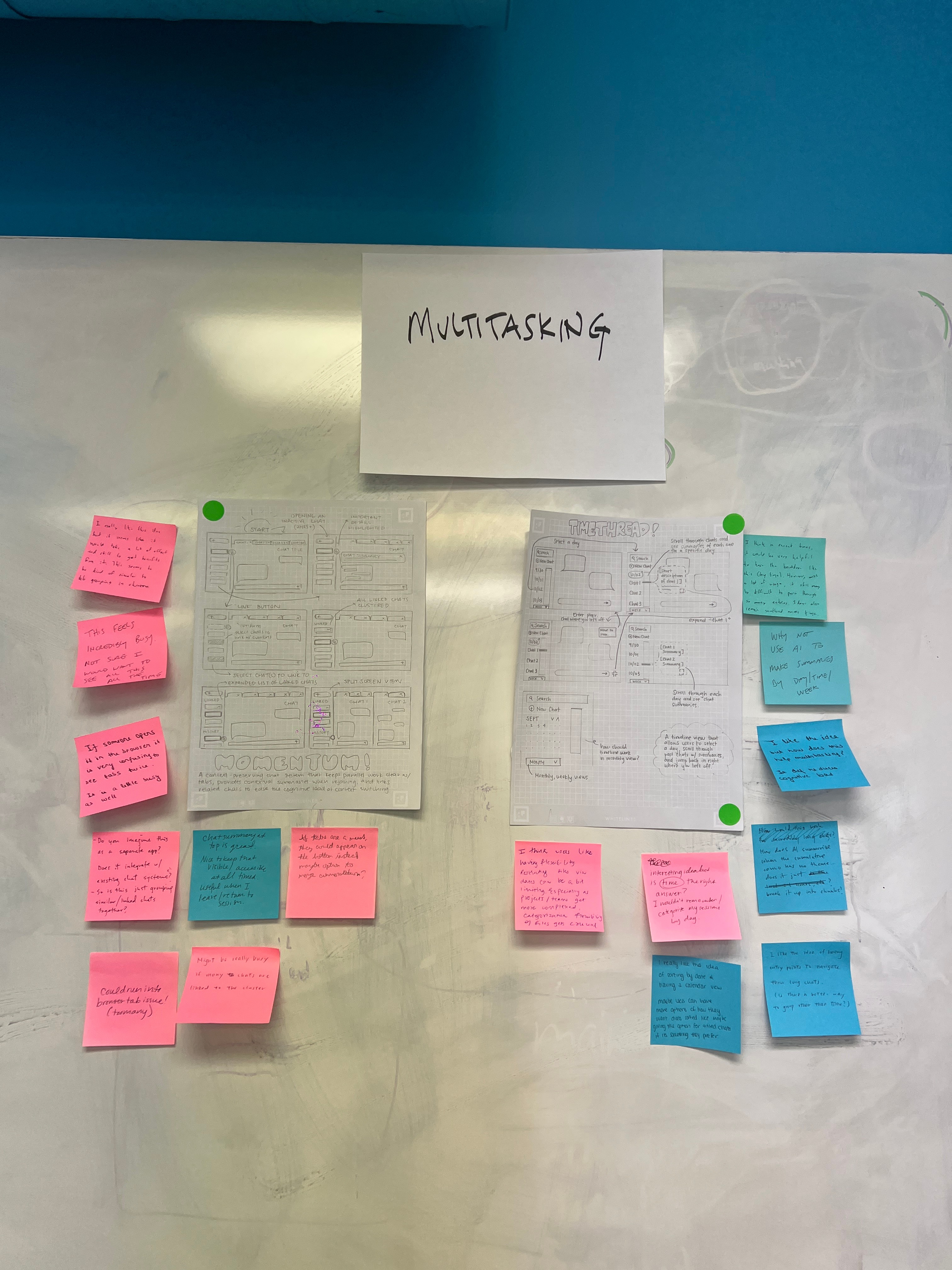
Early ideas like TimeThread and Momentum explored adding structure through timelines and linked conversations to help people re-enter long AI chats. Feedback showed that while users liked having clear cues to remind them what a conversation was about, they quickly felt overwhelmed when too much information was visible at once. Several critiques pointed out that persistent timelines or clusters could feel busy or hard to manage. This helped us realize that structure is most helpful only at the moment of re-entry. Instead of always showing everything, context should appear when users need it and fade away once they are reoriented.
Insight 2
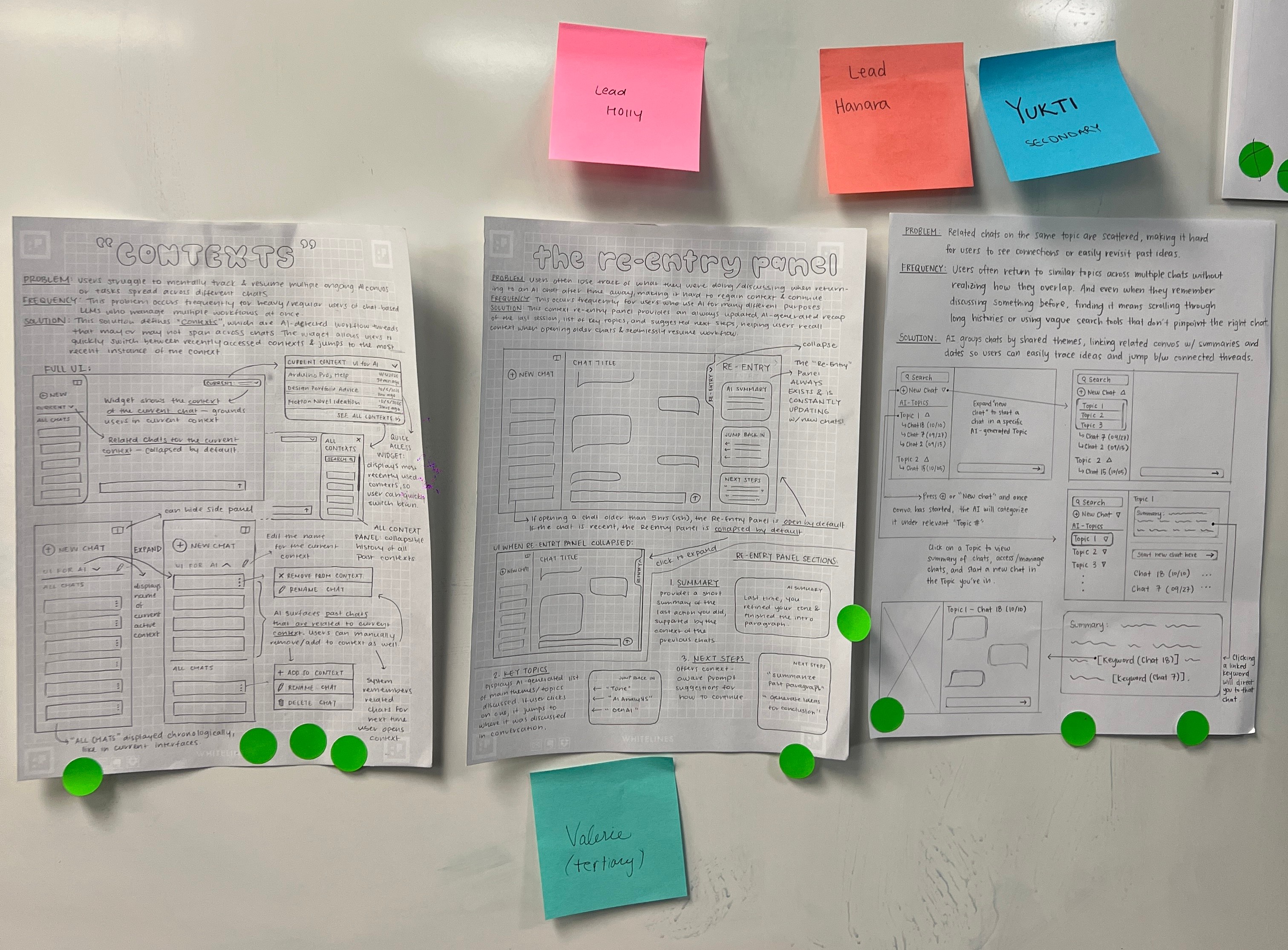
Guided by critique, we honed our ideas into three distinct concepts – Contexts, the Re-Entry Panel, and AI Topics – which together formed the baseline for our next prototypes.
Building on feedback from our initial sketches, we converged on three stronger directions that zeroed in on users’ needs. Contexts grouped related chats so users could seamlessly jump between topics. The always-visible Re-Entry Panel provided conversation summaries, key themes, and next steps to help people quickly re‑enter a task. And an AI Topics organizer sorted past threads by theme to make navigating chat history easier. Each concept tackled the context-switching problem from a different angle, and we realized their strengths were complementary. Rather than choose a single direction, we decided to integrate the best elements of all three. This combined approach gave us a clear focus for the next phase, and it became the foundation for our low-fi and high-fi prototypes.
Solution:
The Re-Entry Panel as a Context Recovery Workspace
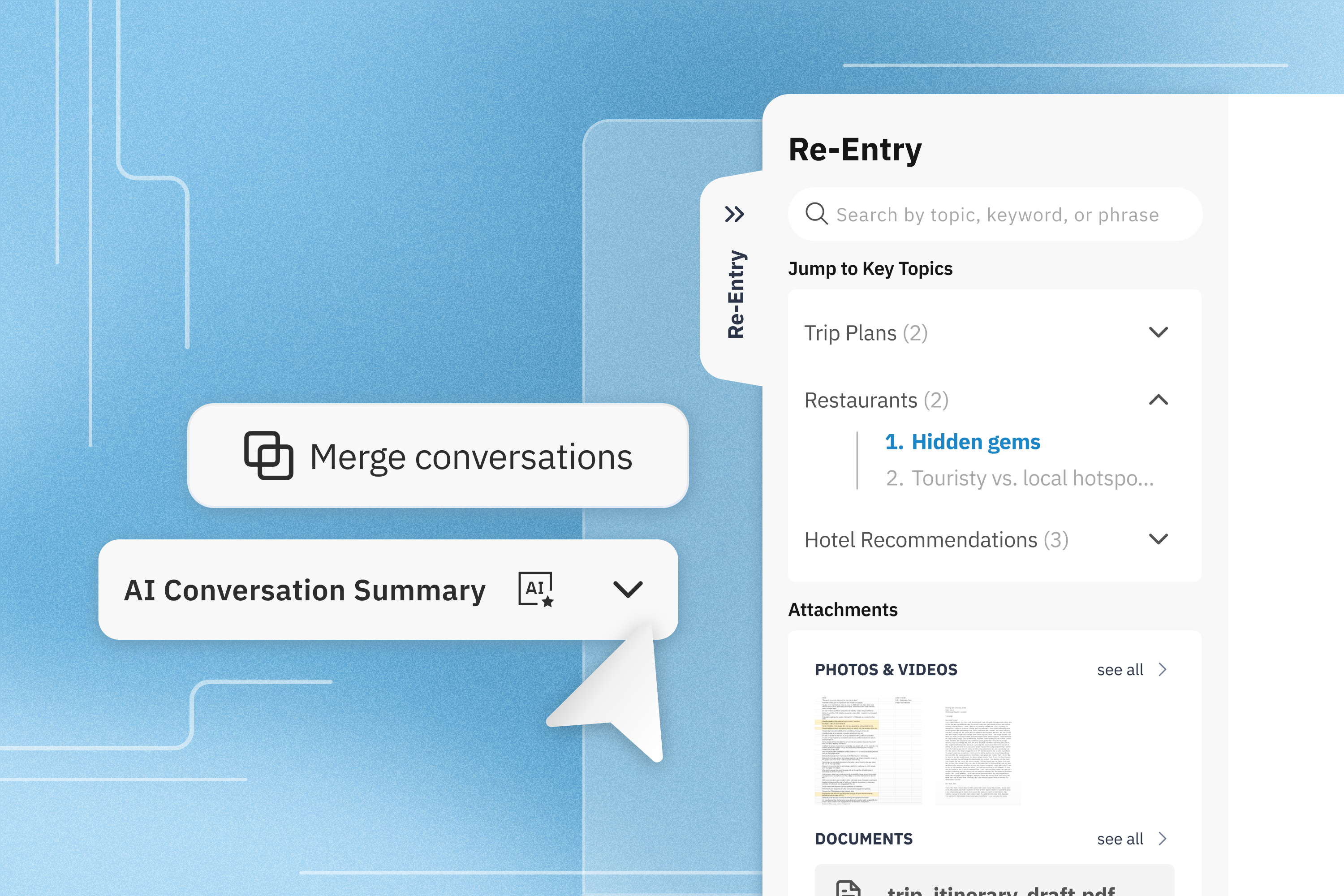
To support fast, low-effort re-entry, we designed the Re-Entry Panel. The panel lives alongside the chat and stays available throughout the conversation, so users can expand or collapse it whenever they need help reorienting. Instead of scrolling through a long transcript, the panel surfaces clear structure and familiar cues that help users quickly find their place and keep working.
Along with the Re-Entry Panel, we also designed a few supporting features outside of the panel that help with context switching.
Concept 1: Recall Search & Thread Map
Finding what you remember via Keywords or Navigating Structure at a Glance
Prototype
Users can re-enter long conversations through Recall Search, typing in fragments they remember—like “hotel,” “beach,” or “kids”—to quickly surface relevant past messages without scrolling through the entire history. As they search, the system doesn’t just return matches; it actively supports memory reconstruction by suggesting related topics and keywords, helping users refine or expand their query when recall is fuzzy.
At the same time, the conversation is structured through AI-generated topics and subtopics, organizing content into clear, scannable sections—similar to headers in Google Docs. These topics appear alongside search results, giving users both a direct path (via keywords) and a structural map (via sections) to navigate the conversation.
Together, search and structure work in tandem: one lets users jump to what they remember, while the other helps them rediscover what they don’t.
Concept 3 & 4: Welcome Back & Next Steps
Navigating Structure at a Glance and Turning Responses Into What’s Next
Prototype
A collapsible brief appears the moment you return, quickly catching you up on the conversation’s current state so you don’t have to re-read the last ten prompts. It restores just enough context to help you reorient—what was discussed, where things left off, and what matters now.
Once that context is re-established, the interface shifts from orientation to action. Context-aware Next Steps surface directly in the main chat as lightweight prompts, helping you move forward without friction. These suggestions autofill the input box rather than sending automatically, reducing the effort of phrasing follow-ups while keeping you fully in control.
Together, this creates a seamless flow from re-entry to continuation: first helping you find your place, then gently guiding your next move—without overwhelming you or interrupting your momentum.
Concept 5: Resume State
Keeping related context available while you work
Prototype
Work is rarely contained in one window. Our design allows for Side-by-Side Reference, letting you pull up related chats in the same view. This means you can borrow logic from a previous project without losing your place in the current one.
Instead of re-asking questions or copying text manually, users can drag outputs from related chats directly into the current conversation. This allows ideas, reasoning, and recommendations to carry across threads, supporting continuity and deeper follow-up without breaking flow.
When those conversations clearly belong together, users can merge them into a single thread. This brings key context, preferences, and decisions forward automatically, allowing work to continue with shared understanding and sustained momentum.
User Testing Insights
Using feedback to simplify the experience and focus on what mattered most.
Testing and Iteration
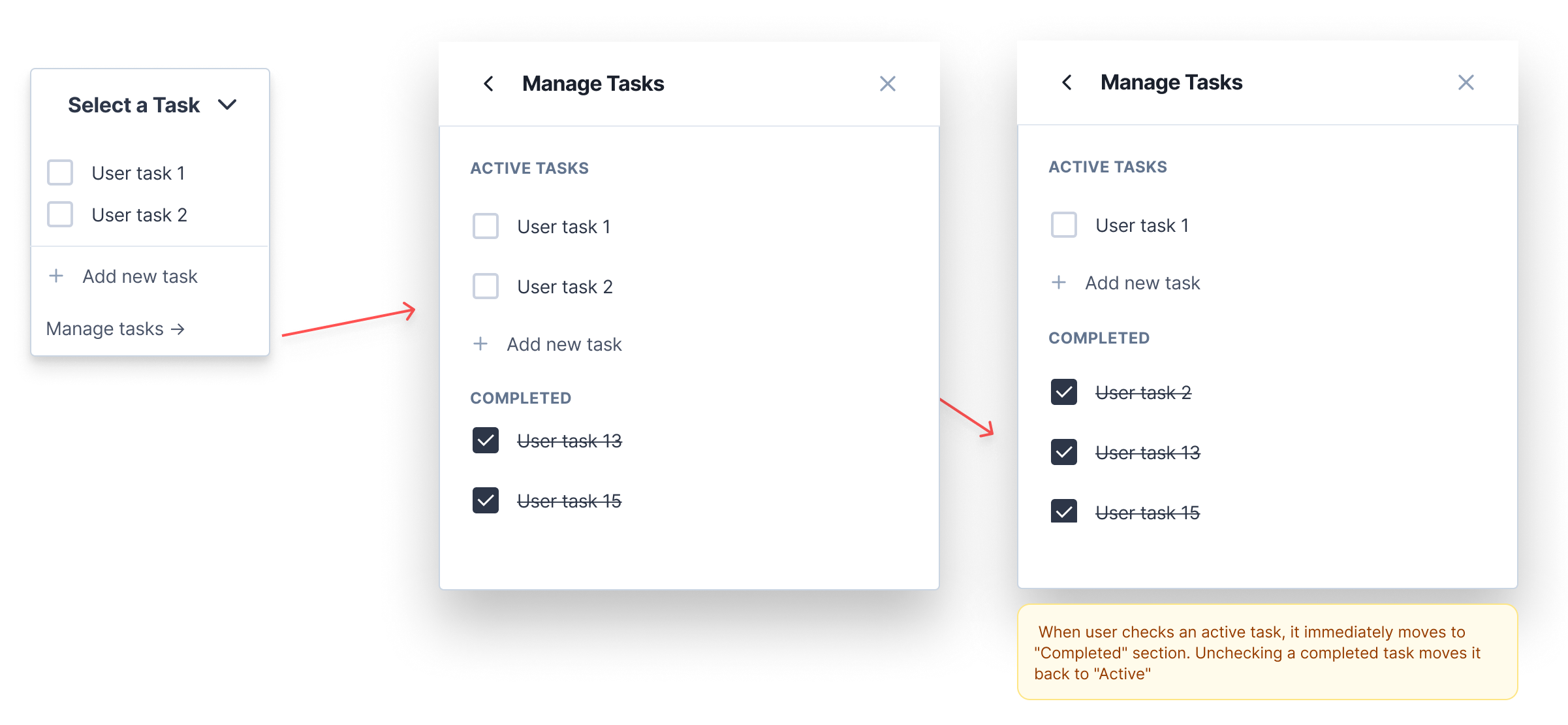
Before settling on a direction, we explored three approaches: a Re-Entry Panel, an AI Topics flow, and a Task Contexts flow. Task Contexts was the most structurally different of the three. Rather than helping users re-enter an existing conversation, it let users define named tasks and tag their chats accordingly, so the AI could automatically surface past conversations relevant to whatever they were currently working on.
Users value automatic context recovery over manual organization.

Reducing scope improved clarity and usability.

Placement matters. Context and suggestions are most helpful when they appear directly in the main chat at the right moment.

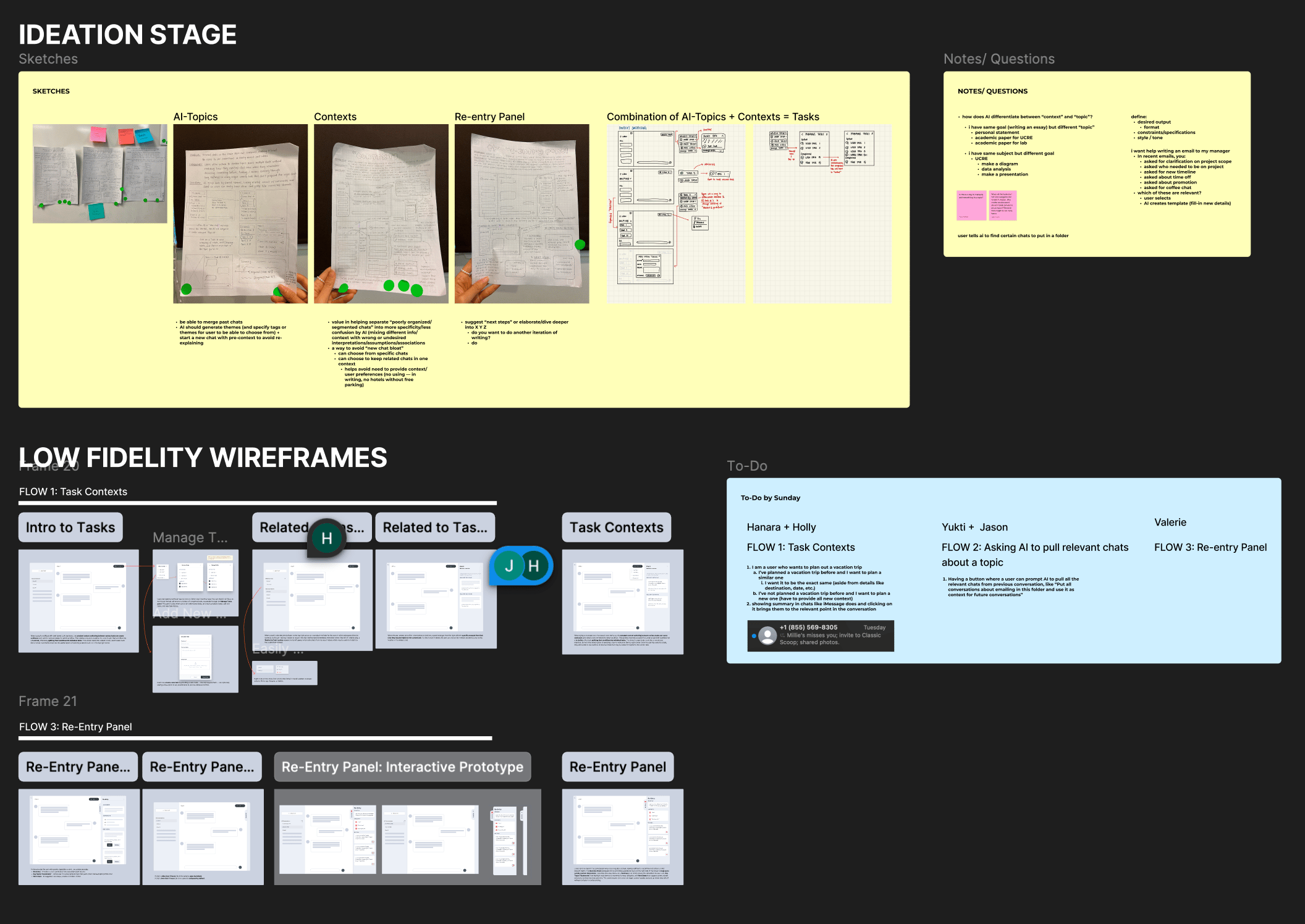
Round 1 — Testing Multiple Directions Reveals Key Insights
We tested three flows to identify where value actually landed.
Task Contexts aimed to organize messy conversation histories by letting users create and tag tasks, with panels for management and surfacing related chats. Re-Entry Panel helped users pick up where they left off with AI summaries and jump points. AI Topics allowed users to prompt the AI to retrieve past conversations by subject.
Users strongly favored the Re-Entry Panel and AI Topics as both felt immediately useful and required no setup. Task Contexts, while conceptually appealing, introduced too much overhead.
Key insights:
- Users prefer AI-assisted reorientation with zero setup
- Manual organization adds friction without clear payoff
- Too much information density slows down refocusing
Click the relevant section to jump directly to that location in the related chat.
RELEVANT SECTION #1
Lorem ipsum dolor sit amet, consectetur adipiscing elit. Sapien ornare vitae amet.

Explanation of how the chat is relevant to the current task
RELEVANT SECTION #2
Lorem ipsum dolor sit amet, consectetur adipiscing elit.
Explanation of how the chat is relevant to the current task
Chat 3
User Task 1


Chat 5


Related to current task


Add new task
→ Manage tasks
User task 1
User task 2
What Changed
Narrowing Focus to What Users Actually Valued
Based on this feedback, we narrowed our scope and doubled down on the Re-Entry Panel, which users consistently found the most helpful. We decided to pause work on the Task Contexts flow since it addressed a slightly different problem and risked overcomplicating the experience. To reduce friction further, we moved the AI summary out of the Re-Entry Panel and into the main chat, allowing it to automatically expand when users returned to an ongoing conversation. This ensured users could regain context instantly without having to open an additional panel.
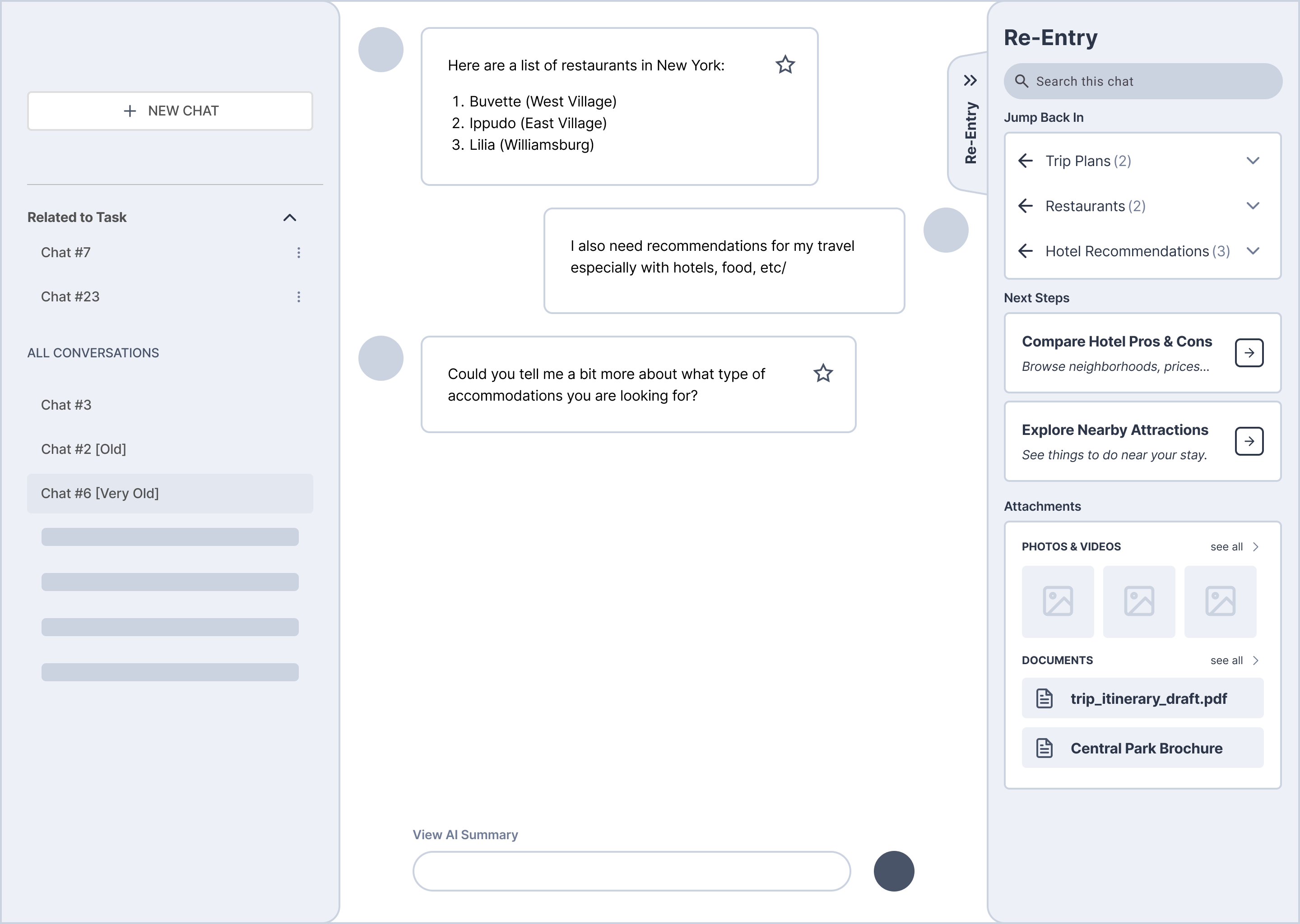
Round 2 — Refining the Experience
Users found the experience noticeably clearer and easier to navigate. One important insight emerged around Next Steps: users saw them less as a re-entry tool and more as a prompt for what to do next. Because they wanted to act on suggestions while actively reading or typing, Next Steps needed to live closer to where the action was happening.
To carry this into the final design, we made two key decisions:
- Next Steps moved out of the Re-Entry Panel and into the chat input area, where users could act on them without interrupting their flow
- Context-setting and forward momentum were treated as distinct needs, each handled in the right place within the interface
Why It Matters
Our user testing showed that re-entry breaks down when people remember fragments, not timelines. Users rarely recall when something happened, but they often remember a few words, files, or themes associated with the task.
Instead of forcing users to reconstruct context by scrolling or relying on perfect recall, our solution introduces lightweight re-entry anchors like keyword-based recall and related topic cues. By making past conversations searchable through the way people naturally remember them, we reduce the friction of context switching and turn long, linear chats into something users can realistically return to and continue.
Reflection
As AI becomes a more permanent fixture in our professional lives, “context switching” will only become more common. We shouldn’t be penalized for taking a break.
The Re-Entry Panel is about making sure that when you step away from your work, your work is ready and waiting for you exactly how you left it. It’s not just about saving time; it’s about saving your focus.
More broadly, this project gestures toward a future where AI chats function less like disposable conversations and more like durable workspaces. Systems that respect how people actually think, pause, and resume over time.


Context Switching
Exploring how AI interfaces can support re-entry, memory, and momentum across interrupted work
Team Members
Yukti Poddar
Valerie Cana
Hanara Nam
Holly Zhu
Jason Park
The Problem
Context Loss in Long-Running AI Work
Most generative AI tools rely on a continuous, linear chat. This model works well for short, single-session interactions, but it breaks down as conversations stretch across hours, days, or weeks.
When users return to an ongoing conversation, they often struggle to reorient. Important decisions, partial outputs, uploaded files, and reasoning steps are buried deep in the transcript. To recover context, users are forced to scroll, skim, and mentally reconstruct what they were doing and why.
This friction becomes especially costly for frequent users who treat AI as an ongoing workspace rather than a one-off assistant. Whether planning a trip, iterating on ideas, writing code, or conducting research, the information is technically still there—but resuming work often requires more cognitive effort than the task itself.
Academic & Secondary Research
Prior HCI research shows that people working on complex tasks rarely move in a straight line. Instead, they explore alternatives, revisit earlier decisions, and recombine ideas across time.
The GEM-NI system (Zaman et al., CHI 2015) highlights how designers naturally work across evolving states. Without structural support, they waste cognitive effort remembering what they did, where things live, and how ideas relate. Tools that surface summaries, clusters, and history dramatically reduce this burden by externalizing memory.
We saw the same pattern in long AI conversations. Returning users are not just trying to remember content. They are trying to:
- Reestablish where they left off in a workflow
- Reconstruct their original intent
- Reconnect threads scattered across messages or even across chats
GEM-NI’s principles—summaries, surfaced history, clustering, and recombination—directly informed the Re-Entry Panel’s approach to summaries, topics, search, and related chats.
From Framing to Exploration
Bringing together insights from research helped us land on a clear design question. From there, we moved straight into visual thinking. We used structured sketching to explore multiple directions before narrowing, rather than locking into one idea too early.
How might we help people quickly re-enter an AI conversation
without losing context or momentum?
Insight 1
Structure Helps Until It Becomes Overwhelming
Early ideas like TimeThread and Momentum explored adding structure through timelines and linked conversations to help people re-enter long AI chats. Feedback showed that while users liked having clear cues to remind them what a conversation was about, they quickly felt overwhelmed when too much information was visible at once. Several critiques pointed out that persistent timelines or clusters could feel busy or hard to manage. This helped us realize that structure is most helpful only at the moment of re-entry. Instead of always showing everything, context should appear when users need it and fade away once they are reoriented.
Insight 2
Guided by critique, we honed our ideas into three distinct concepts – Contexts, the Re-Entry Panel, and AI Topics – which together formed the baseline for our next prototypes.
Building on feedback from our initial sketches, we converged on three stronger directions that zeroed in on users’ needs. Contexts grouped related chats so users could seamlessly jump between topics. The always-visible Re-Entry Panel provided conversation summaries, key themes, and next steps to help people quickly re‑enter a task. And an AI Topics organizer sorted past threads by theme to make navigating chat history easier. Each concept tackled the context-switching problem from a different angle, and we realized their strengths were complementary. Rather than choose a single direction, we decided to integrate the best elements of all three. This combined approach gave us a clear focus for the next phase, and it became the foundation for our low-fi and high-fi prototypes.
Solution:
The Re-Entry Panel as a Context Recovery Workspace
To support fast, low-effort re-entry, we designed the Re-Entry Panel. The panel lives alongside the chat and stays available throughout the conversation, so users can expand or collapse it whenever they need help reorienting. Instead of scrolling through a long transcript, the panel surfaces clear structure and familiar cues that help users quickly find their place and keep working.
Along with the Re-Entry Panel, we also designed a few supporting features outside of the panel that help with context switching.
Concept 1 & 2: Recall Search & Thread Map
Finding what you remember via Keywords or Navigating Structure at a Glance
Prototype
Users can re-enter long conversations through Recall Search, typing in fragments they remember—like “hotel,” “beach,” or “kids”—to quickly surface relevant past messages without scrolling through the entire history. As they search, the system doesn’t just return matches; it actively supports memory reconstruction by suggesting related topics and keywords, helping users refine or expand their query when recall is fuzzy.
At the same time, the conversation is structured through AI-generated topics and subtopics, organizing content into clear, scannable sections—similar to headers in Google Docs. These topics appear alongside search results, giving users both a direct path (via keywords) and a structural map (via sections) to navigate the conversation.
Together, search and structure work in tandem: one lets users jump to what they remember, while the other helps them rediscover what they don’t.
Concept 3 & 4: Welcome Back & Next Steps
Navigating Structure at a Glance and Turning Responses Into What’s Next
Prototype
A collapsible brief appears the moment you return, quickly catching you up on the conversation’s current state so you don’t have to re-read the last ten prompts. It restores just enough context to help you reorient—what was discussed, where things left off, and what matters now.
Once that context is re-established, the interface shifts from orientation to action. Context-aware Next Steps surface directly in the main chat as lightweight prompts, helping you move forward without friction. These suggestions autofill the input box rather than sending automatically, reducing the effort of phrasing follow-ups while keeping you fully in control.
Together, this creates a seamless flow from re-entry to continuation: first helping you find your place, then gently guiding your next move—without overwhelming you or interrupting your momentum.
Concept 5: Resume State
Keeping related context available while you work
Prototype
Work is rarely contained in one window. Our design allows for Side-by-Side Reference, letting you pull up related chats in the same view. This means you can borrow logic from a previous project without losing your place in the current one.
Instead of re-asking questions or copying text manually, users can drag outputs from related chats directly into the current conversation. This allows ideas, reasoning, and recommendations to carry across threads, supporting continuity and deeper follow-up without breaking flow.
When those conversations clearly belong together, users can merge them into a single thread. This brings key context, preferences, and decisions forward automatically, allowing work to continue with shared understanding and sustained momentum.
User Testing Insights
Using feedback to simplify the experience and focus on what mattered most.
Testing and Iteration
Before settling on a direction, we explored three approaches: a Re-Entry Panel, an AI Topics flow, and a Task Contexts flow. Task Contexts was the most structurally different of the three. Rather than helping users re-enter an existing conversation, it let users define named tasks and tag their chats accordingly, so the AI could automatically surface past conversations relevant to whatever they were currently working on.
Round 1 — Testing Multiple Directions Reveals Key Insights
We tested three flows to identify where value actually landed.
Task Contexts aimed to organize messy conversation histories by letting users create and tag tasks, with panels for management and surfacing related chats. Re-Entry Panel helped users pick up where they left off with AI summaries and jump points. AI Topics allowed users to prompt the AI to retrieve past conversations by subject.
Users strongly favored the Re-Entry Panel and AI Topics as both felt immediately useful and required no setup. Task Contexts, while conceptually appealing, introduced too much overhead.
Key insights:
- Users prefer AI-assisted reorientation with zero setup
- Manual organization adds friction without clear payoff
- Too much information density slows down refocusing
What Changed
Narrowing Focus to What Users Actually Valued
Task Contexts was deprioritized. It addressed a slightly different problem and risked pulling the experience in two directions at once. We committed fully to the Re-Entry Panel and moved the AI summary out of the panel and into the main chat itself, set to expand automatically when users returned to an ongoing conversation. The goal was to make context available instantly, with no extra steps required.
Click the relevant section to jump directly to that location in the related chat.
RELEVANT SECTION #1
Lorem ipsum dolor sit amet, consectetur adipiscing elit. Sapien ornare vitae amet.

Explanation of how the chat is relevant to the current task
RELEVANT SECTION #2
Lorem ipsum dolor sit amet, consectetur adipiscing elit.
Explanation of how the chat is relevant to the current task
Chat 3
User Task 1


Chat 5


Related to current task


Add new task
→ Manage tasks
User task 1
User task 2
Round 2 — Refining the Experience
Users found the experience noticeably clearer and easier to navigate. One important insight emerged around Next Steps: users saw them less as a re-entry tool and more as a prompt for what to do next. Because they wanted to act on suggestions while actively reading or typing, Next Steps needed to live closer to where the action was happening.
To carry this into the final design, we made two key decisions:
- Next Steps moved out of the Re-Entry Panel and into the chat input area, where users could act on them without interrupting their flow
- Context-setting and forward momentum were treated as distinct needs, each handled in the right place within the interface
Why It Matters
Our user testing showed that re-entry breaks down when people remember fragments, not timelines. Users rarely recall when something happened, but they often remember a few words, files, or themes associated with the task.
Instead of forcing users to reconstruct context by scrolling or relying on perfect recall, our solution introduces lightweight re-entry anchors like keyword-based recall and related topic cues. By making past conversations searchable through the way people naturally remember them, we reduce the friction of context switching and turn long, linear chats into something users can realistically return to and continue.
Reflection
As AI becomes a more permanent fixture in our professional lives, “context switching” will only become more common. We shouldn’t be penalized for taking a break.
The Re-Entry Panel is about making sure that when you step away from your work, your work is ready and waiting for you exactly how you left it. It’s not just about saving time; it’s about saving your focus.
More broadly, this project gestures toward a future where AI chats function less like disposable conversations and more like durable workspaces. Systems that respect how people actually think, pause, and resume over time.