Memory Handling
Exploring User-Led Memory Mechanisms in AI Conversations
Team Members



Holly Zhu
Erica Flora Yu

Jason Park

Dave Song
The Problem
The Flat-Memory Fallacy: Why Data Isn’t User Experience
Getting a first draft from AI is easy. Refining it is where things fall apart.
Generative AI tools excel at helping users get started. Still, during iteration, users are often stuck between broad “regenerate” actions that overwrite what works and manual edits that break flow and require switching tools.
This is especially frustrating in creative and analytical work, where progress often occurs through small incremental changes. Often, only a paragraph, sentence, or argument needs refinement, yet current AI workflows don’t support selective editing. Even follow-up prompts can feel risky, triggering unpredictable changes that overwrite intent or introduce new issues elsewhere.
As a result, refining AI-generated content becomes a disruptive process that forces users to choose between losing control and investing unnecessary effort.
These frustrations led us to ask:
Academic & Secondary Research
We didn't start from scratch. We started from the works of people who had already stared at this problem. Before sketching a single wireframe, we went back to the research. Four papers stood out; not because they solved our problem, but because each poked a different hole in it. Here’s a quick overview of our findings.

The interface is lying to you about how information works.
Sensescape: Suh et al. 2023
Sensecape is built on a simple but radical idea: more information isn't the problem. Flat information is. Their system uses multilevel abstraction and semantic zoom, letting users move fluidly between a high-level overview and granular detail without losing their place.
The insight that stuck with us:
- A long chat history isn't overwhelming because it's long
- It's overwhelming because it has no hierarchy
- Users don't need less. They need levels
This became the backbone of our Threads Dashboard. Memory shouldn't be a pile. It should be a landscape you can navigate.

Your chat interface has a scrolling problem. And a copy-paste problem. And a "where did I read that" problem.
Graphologue: Jiang et al. 2023
They ran a simple formative study: watch people use ChatGPT for complex tasks. What they found wasn't surprising, but seeing it documented was validating. Users scrolled endlessly, copy-pasted frantically, and repeatedly lost track of what they'd already covered.
The culprit?
The linear conversation structure, a format designed for messaging apps, not knowledge work.
Their solution was graphical and non-linear. Ours was structural:
- Threads break the chronological scroll
- Knots anchor the moments that actually matter
- The interface stops pretending every message is equally important

The AI doesn't know you. And it's not even trying to ask.
CARE: Peng et al. 2025
CARE tackles the personalization gap head-on. Their system separates the chat from a dedicated Needs Panel; a space where implicit preferences get made explicit over time through proactive inquiry. Instead of waiting for users to volunteer context, the system goes looking for it.
The core principle we borrowed:
- Memory shouldn't just be stored
- It should be earned through collaboration
- The user and the system build understanding together. Not the system alone
This is exactly why we designed Knots as a collaborative curation tool, not an automated one.

The forgetting is architectural, not accidental.
Seo et al. 2025
Seo et al. built a prompt chaining framework specifically to address long-term recall in intelligent assistants and actually measured the results across multiple datasets and 47 human evaluators. Improvements in sensibleness, consistency, and personalization weren't marginal. They were structural.
But the part that hit hardest was their formative study. When asked about AI memory, one participant said it plainly:
"I don't believe assistants learn during conversations."
That's not apathy. That's a user who has already given up expecting better.
Key takeaway:
- The problem isn't that AI memory is hard
- It's that current systems aren't architecturally designed to remember
- And users feel that gap every single time they have to re-explain themselves
So what does the research actually tell us?
Every paper pointed at the same structural failure: AI memory is system-centric. It is optimized for the model's efficiency, not the user's ability to navigate their own history.
Our research goal was simple:
Flip that orientation.
Design memory the way humans actually use it; layered, intentional, and always in the user's hands.
Solution:
Beyond the Sidebar, Weaving Memory Through Threads and Knots.
The chat sidebar was never designed to be your second brain. We built something that actually tries to be.
After two rounds of user testing and a deep dive into the research, one thing became undeniable: the problem wasn't that AI forgets. It's that there was never a real place for it to remember. Every solution we developed came back to the same belief: memory should be a collaboration, not a black box. Here's what that looks like in practice.
A quick note on metaphor before we get into it.
We could have called these things "folders" or "clusters" or "collections." We didn't. Folders are for files. Conversations aren't files; they're living, evolving things. The Thread metaphor is deliberate: it implies continuity, connection, and the fact that things can come loose. That subtle shift in language shapes how the whole system feels to use.
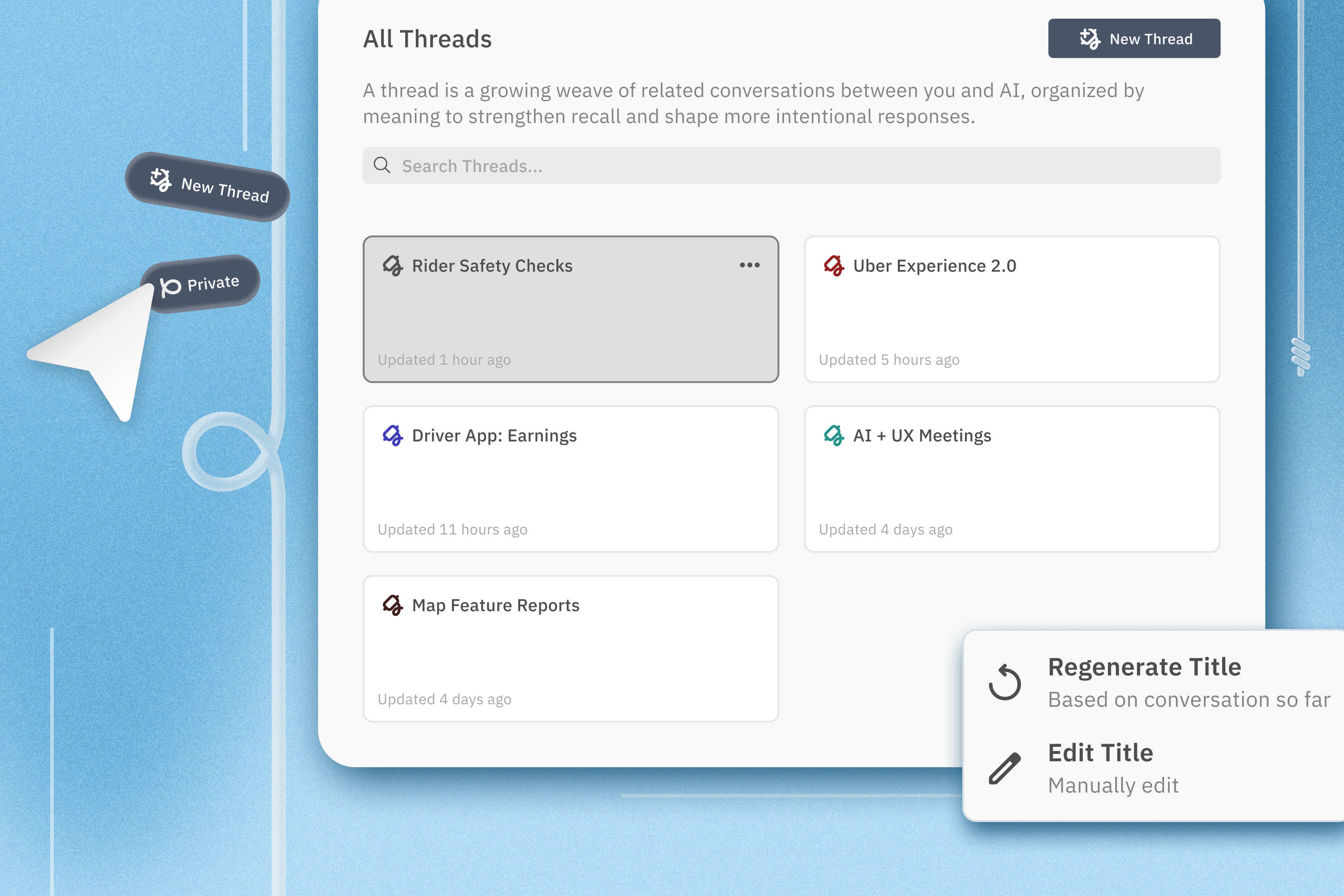
Concept 1: A Control Center for Your Memory
Semantic Threading: Grouping What Actually Belongs Together

Right now, your chat history is a timeline. Useful for finding what you said yesterday. Useless for finding what you meant three weeks ago in the middle of a project.
Semantic Threading replaces the chronological list with something more honest: a Threads Dashboard that groups conversations by thematic relevance, not recency. Think of it as your memory organized the way your brain actually works: by topic, not by timestamp.
What users can do inside it:
- Refine clusters: manually merge or split groups to match your own mental model
- Edit Knots: update or remove specific memory anchors (more on those below)
- Curate system memory: explicitly delete irrelevant noise so the AI's long-term context stays clean and useful
The goal isn't automation. It's giving you a dashboard you'd actually want to open.
Concept 2: Not Every Chat Deserves to Live Forever
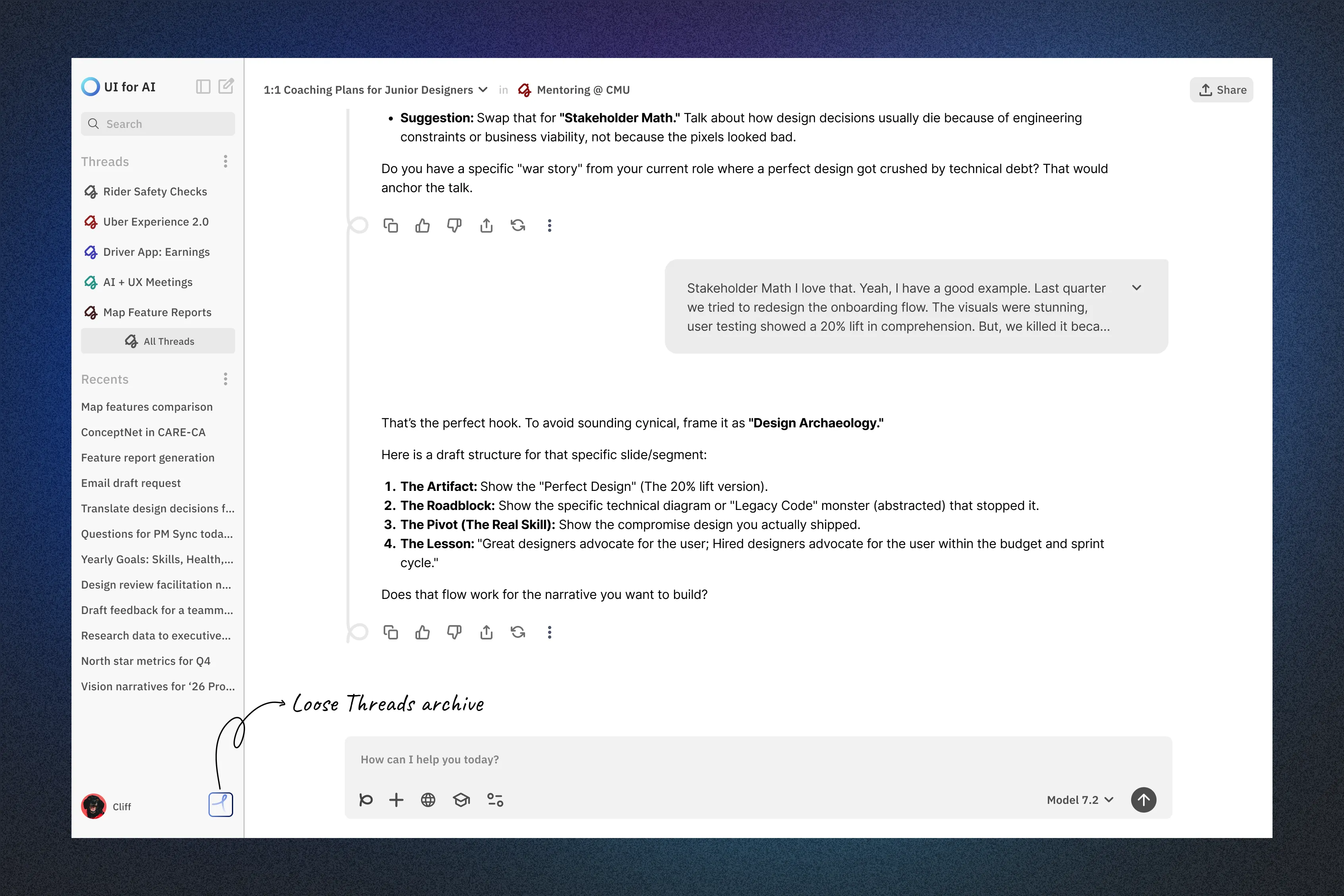
The Loose Threads Archive: Separating Signal from Noise
Here's something our user research confirmed quickly: people use AI in two completely different modes. There's the focused, ongoing project work, and then there's the throwaway stuff like "What's a good substitute for buttermilk?" or "Write me a quick birthday message for my coworker."
The problem is that right now, both live in the same place. The one-off queries clutter the workspace and dilute the threads that actually matter.
Enter Loose Threads: a dedicated archive for interactions that don't need to stick around. Chats automatically move here if they've been inactive for 60 days or never had a Memory Knot attached. They're not deleted. They're just out of the way.
Clean workspace. Nothing lost. The difference is intentional.
Concept 3: Start Every Session Knowing Where You Left Off
Memory Flow: Priming the AI Before You Even Type

Most AI sessions start the same way: you open a blank prompt box, and the system knows nothing. You're back to square one every single time.
Memory Flow changes that. Before any input, users can select specific Threads to prime the AI with relevant context, surfacing the knowledge, decisions, and snippets that matter for what they're about to do.
We also replaced the AI's auto-generated session titles with User-Defined Title Edits. Small change, big difference. When you can name your own sessions, you leverage your own episodic memory. The where and when of an interaction becomes instantly recognizable. You stop searching and start finding.
Concept 4: You Decide What's Worth Remembering
Memory Knots: Collaborative Curation in Real Time
The AI shouldn't decide what matters to you. But it also shouldn't make you do all the work.
Memory Knots live in the middle of that tension.
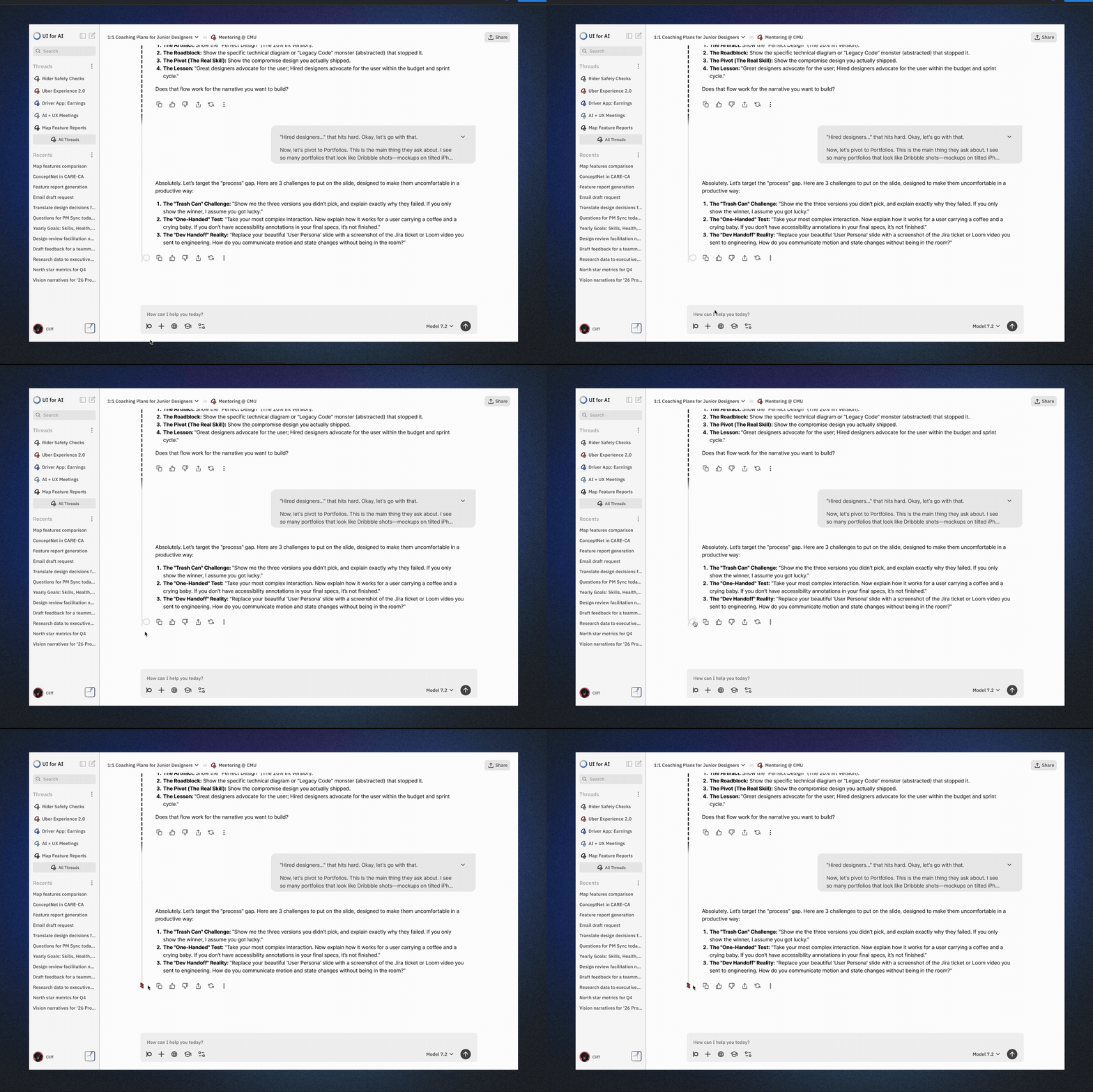
While working inside any Thread, users can manually tie a knot on a high-value insight, a specific output, or an answer they want to come back to. These Knots become persistent anchors, automatically surfaced in the Threads Dashboard where users can review, edit, or delete them at any time.
The result: when you return to a project weeks later, the system remembers exactly what you marked as important. Not everything. Not nothing. The right things.
Concept 5: Privacy That Follows the Conversation, Not the Session
Adaptive Privacy Flow: Going Off the Record Without Starting Over

Every other privacy mode in AI right now is a blunt instrument. Incognito mode means nothing gets remembered. But sometimes you need the context of an ongoing project to ask something sensitive. You shouldn't have to choose between privacy and continuity.
Our Privacy Flow operates at the message level, not the session level. A single toggle within an active Thread lets users mark a specific query as off the record, using the existing context without adding sensitive details to long-term memory.
It's not about hiding. It's about having the right information stay in the right place.
From Papers to Prototypes: Translating Research into Design
The literature review didn't just inform our thinking. It gave us a vocabulary. Each paper pointed at a real structural failure in how AI products handle memory, and together they drew a surprisingly coherent picture of what a better system might need to do.
But reading about a problem and designing for it are two different things. So we took what the research gave us and asked a simpler question:
What would this actually look like?
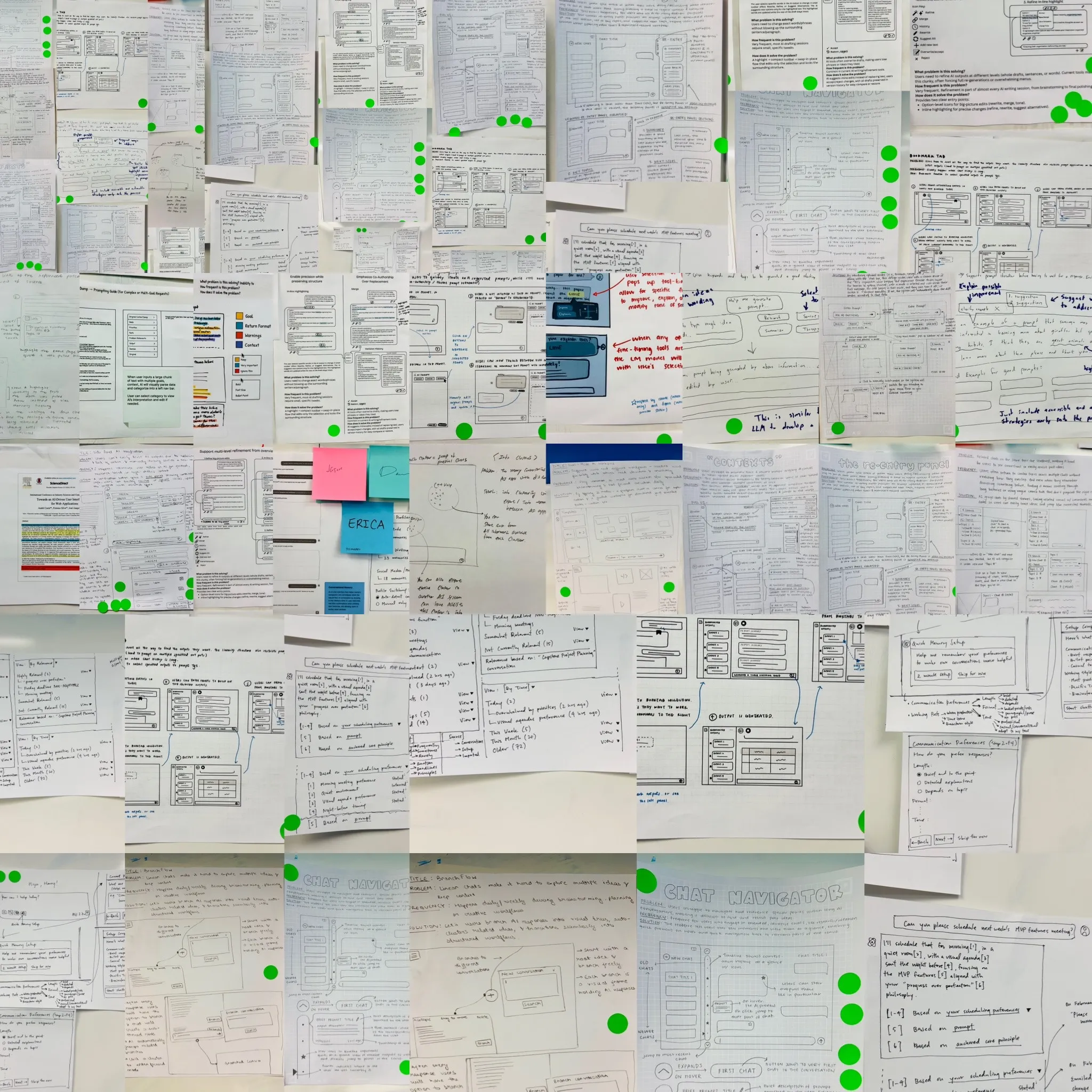
That question sent us to the sketchpad. Before wireframes, before prototypes, before any of the polished concepts you saw above, we started with rough drawings and half-formed ideas, trying to figure out how to visually and structurally represent the patterns the research kept surfacing.
Two Rounds of User Tests & Insights
From Sketches to Final Concepts
From the sketches and ideation phases, we converged on three directions that felt most promising as the foundation for a memory handling system. Not everything survived the user testing rounds intact, but each one taught us something. These early concepts, Memory Flow with Clusters, Memory Profile Page, and Embedded Memory Components within chats, became the raw material for what eventually turned into Threads, the Control Panel, and Knots respectively.
Concept A: Memory Flow with Clusters
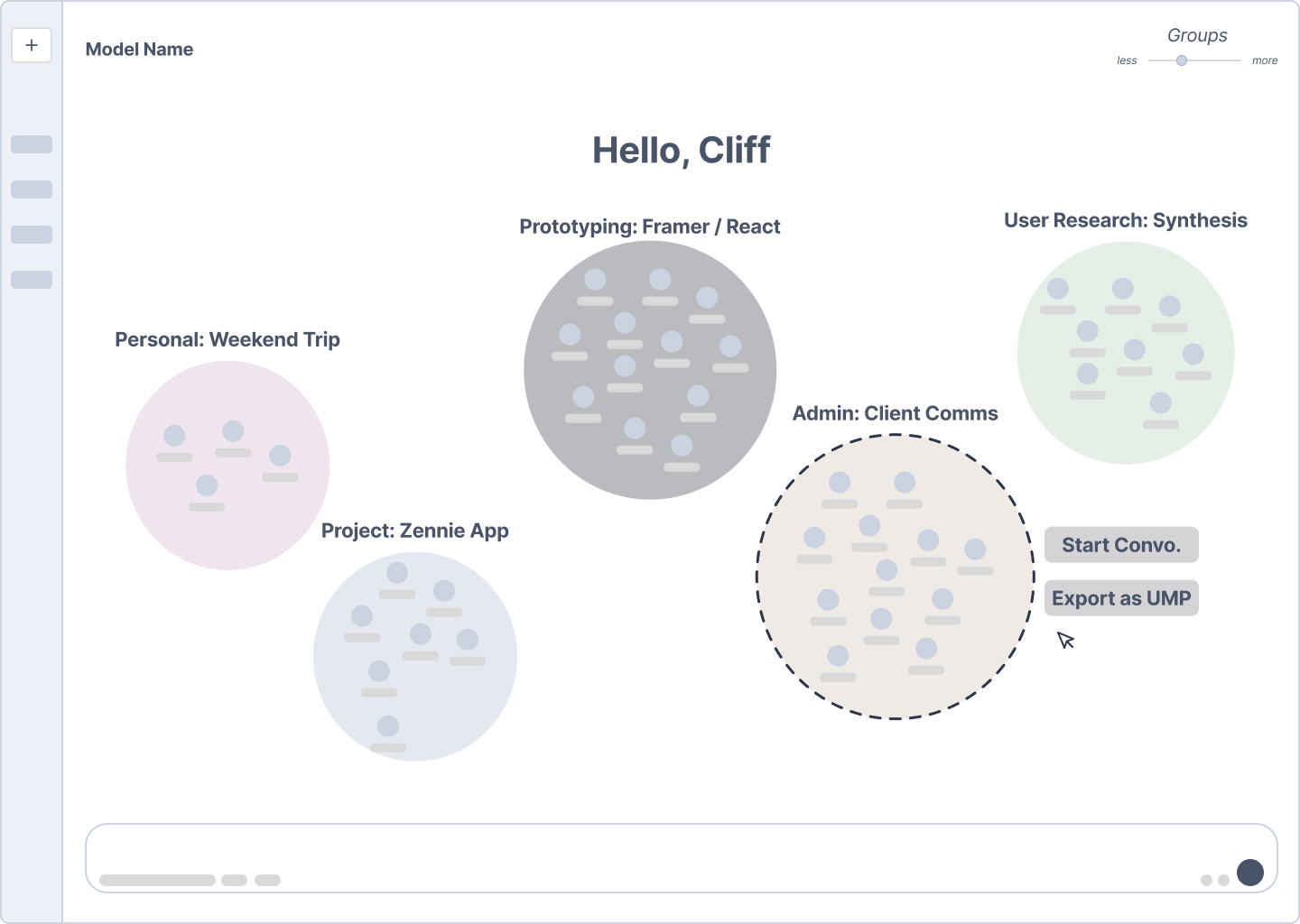
The first concept approached memory as a spatial problem. Rather than a list, conversations would live on an interactive canvas, automatically grouped into thematic clusters. Users could zoom in and out: at a glance, they'd see the shape of their work; zoomed in further, individual chat summaries and takeaways would surface in what we called the Atom View.
Key interactions we explored:
- Zoom levels that reveal progressively more detail, from cluster shape down to individual chat summaries
- Manual cluster editing: drag chats out, create new groups, rename on the fly
- A speculative UMP (User Memory Protocol) concept: the ability to export your memory context across different AI apps, the way you'd share a PDF
The big question this raised in testing: is a spatial canvas the right mental model for memory, or does it create its own kind of overwhelm?
Concept B: Memory Profile Page
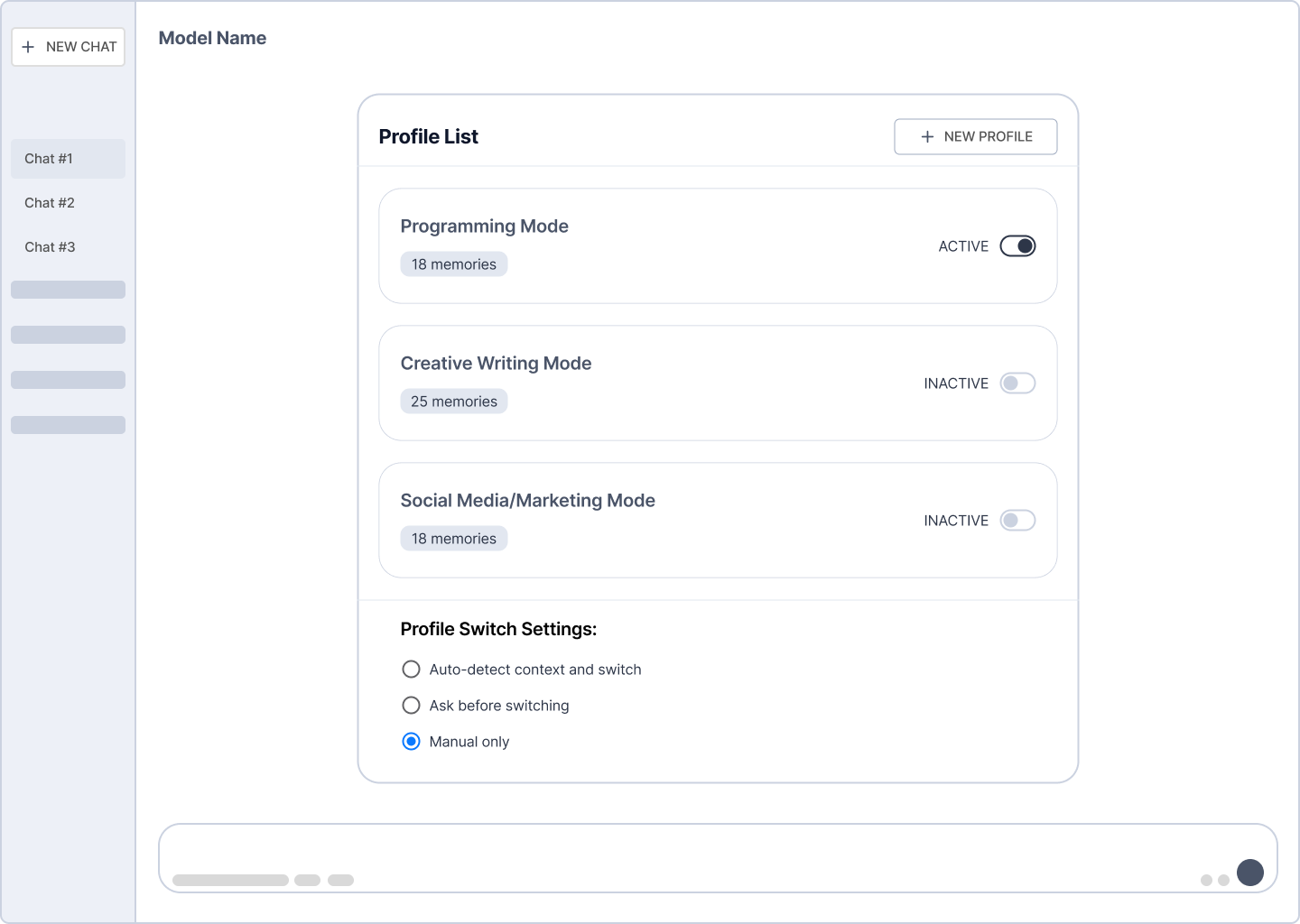
The second concept treated memory as something you configure, not something that just accumulates. Users could create distinct profiles, like Programming Mode, Creative Writing Mode, or Social Media Mode, each carrying its own set of memories and context.
Key interactions we explored:
- Activating and deactivating profiles based on the task at hand
- Controlling how the system switches between profiles: automatically, with a prompt, or manually only
- Keeping memory contexts cleanly separated so a creative writing session doesn't bleed into a technical one
The underlying idea: your AI should know which version of you it's talking to.
Concept C: Embedded Memory Components within Chats
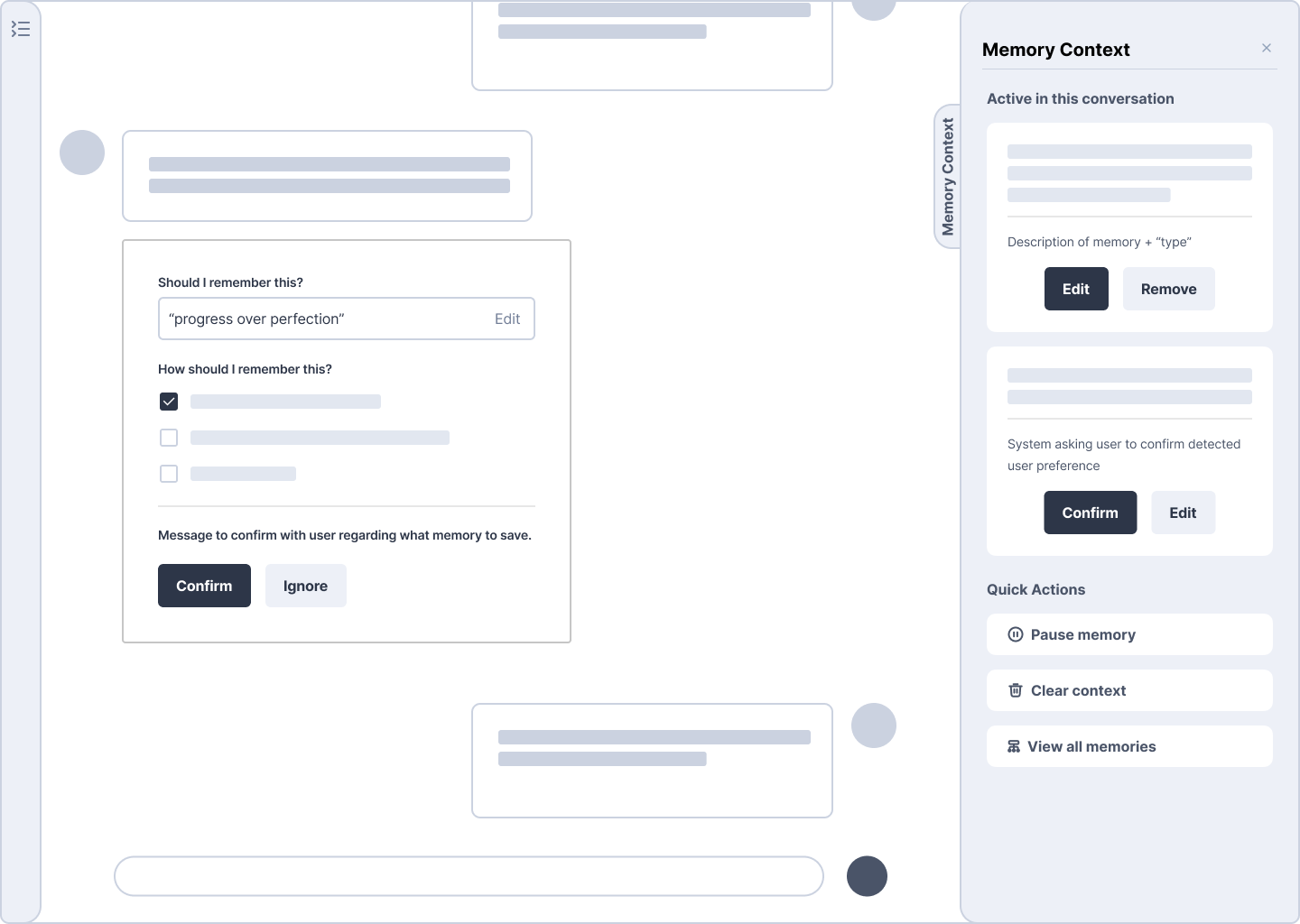
The third concept kept memory closest to where the work actually happens. Inside any conversation, the AI would quietly detect memory-worthy moments, things like preferences, working philosophies, or recurring patterns, and surface them for the user to confirm or dismiss before they ever made it to long-term storage.
Key interactions we explored:
- An inline confirmation prompt asking "Should I remember this?" with user-editable framing
- A persistent Memory Context Panel showing exactly which memories are actively influencing the AI's behavior right now
- Quick Actions for pausing memory, clearing context, or reviewing everything the system currently knows
The core principle: nothing gets saved without a soft nod from the user. Automation with a human in the loop.
User Testing Insights
We tested three early concepts across two rounds of user interviews. What we heard didn't invalidate our ideas. It sharpened them into something people would actually use.


Insight 1: Nobody is saving their chat history.
Users don't treat chat history as a resource. They treat it as scrap paper.
Retyping a question was faster than scrolling through a cluttered, auto-titled thread to find something they'd already asked. This reframed Concept A entirely. A spatial canvas is only useful if people believe their history is worth organizing. So we stopped designing for the archive and started designing against retrieval friction:
- User-defined titles instead of AI-generated ones that lie
- Automatic archiving of low-value chats so the workspace stays clean
- Clustering scoped to serious, ongoing work, not every throwaway query
Concept A didn't disappear. It became the Threads Dashboard and the Loose Threads archive.


Insight 2: The canvas was exciting. The privacy exposure was not.
Participants liked visual clustering. But seeing all their conversations grouped on a landing page felt like opening to a surveillance dashboard. One participant described memory components surfacing mid-conversation as feeling like a dream flashback.
The feedback was clear: privacy couldn't be a setting. It had to be structural.
That's where the Dual Zone model came from:
- A Structured Workspace where memory and clustering are active
- An Ephemeral Scratchpad where nothing is logged or saved
And instead of session-level incognito, we designed message-level privacy: go off the record without losing the context you've already built.

Insight 3: Modes clicked instantly. The management overhead didn't.
Memory Profile Page was the fastest to land. Participants immediately mapped it onto systems they already knew; Figma's Dev and Design modes, Arc browser profiles. The mental model was already there.
But two things needed to change. Users didn't want to manually manage switching. And the categories felt too rigid. One participant wanted a 50/50 blend of programming and creative modes for hybrid tasks.
What survived was the core insight:
the AI should know which version of you it's talking to. What we cut was the overhead of maintaining a full profile library. Memory Flow in the final solution lets users prime the right context before they start typing, without building a system to manage it.

Insight 4: Confirmation prompts are powerful. Until they're not.
Concept C generated the most nuanced reaction. The idea of the AI asking "should I remember this?" felt genuinely empowering, until participants imagined it firing every few messages. Then it became the most annoying feature in the product.
The line between empowering and overbearing was thin. What users actually wanted:
- A lightweight nudge, not a modal
- Prompts at natural milestones, not after every exchange
- Full visibility into what's saved, with easy edit and delete
- The ability to pause memory for sensitive stretches
This tension became Memory Knots. Instead of the system deciding what matters, you tie a knot when something is worth keeping. Explicit collaboration, not silent assumption.
Why It Matters
Every time an AI forgets you, it sends a quiet signal: your context isn't worth keeping. Compounded across hundreds of interactions, that quietly limits what AI can become as a tool for serious work. The systems we have today are optimized for the model's efficiency, not the user's ability to navigate their own thinking. That's the Flat-Memory Fallacy: mistaking data storage for user experience. Knowledge work compounds. The insight from three weeks ago is the foundation for the decision you're making today. A system that can't hold that thread isn't a second brain. It's a very fast search engine that forgets you every night.
The opportunity isn't just better memory. It's a fundamentally different relationship between people and their tools.
Future Directions
We solved for version one. Here's what version two needs.
- Cross-app memory portability: As AI agents embed across more surfaces, who owns your memory and where it can travel becomes urgent. The User Memory Protocol idea we explored early on pointed at something real; it just needs the ecosystem to catch up.
- Clustering that learns from correction: When a user splits a cluster or moves a chat, the system should learn from that correction, not just execute it.
- Memory for teams: Every insight here was oriented around a single user. Collaborative memory, shared context with individual privacy, is almost entirely unexplored design territory.
- The ethics of remembering: Consent, retention limits, and the right to be forgotten aren't just legal requirements. They're design requirements. The most trustworthy memory system is one where users never have to wonder what it knows.

Memory Handling
Exploring User-Led Memory Mechanisms in AI Conversations
Team Members
Erica Flora Yu
Dave Song
Jason Park
The Problem
The Flat-Memory Fallacy: Why Data Isn’t User Experience
Getting information from AI is easy. Finding it again is where things fall apart.
"Do you remember that paper on AI sycophancy I shared last week?"
ChatGPT: "I don't have access to previous sessions, so I can't reliably recall the title…"
"Neither do I... it's buried somewhere in the chat sidebar."
This isn't just a technical limitation.
It's a fundamental mismatch between how AI systems store information and how people actually think. Current solutions like expanded context windows or RAG prioritize the model's efficiency over the user's ability to navigate their own history. The result is a flat, opaque archive that puts the burden entirely on the user to remember what they once knew.
This matters most in knowledge work, where insight builds over time. What users actually need mirrors how biological memory works: the situational where and when of a conversation, the concepts and truths extracted from it, and the habits and workflows that emerge from repeated use. No current AI product supports this, and users feel it every time they lose something they can't get back.
So personal context, which should be an asset, becomes a source of friction instead.
Academic & Secondary Research
We didn't start from scratch. We started from the works of people who had already stared at this problem. Before sketching a single wireframe, we went back to the research. Four papers stood out; not because they solved our problem, but because each poked a different hole in it. Here’s a quick overview of our findings.
The interface is lying to you about how information works.
Sensescape: Suh et al. 2023
Sensecape is built on a simple but radical idea: more information isn't the problem. Flat information is. Their system uses multilevel abstraction and semantic zoom, letting users move fluidly between a high-level overview and granular detail without losing their place.
The insight that stuck with us:
- A long chat history isn't overwhelming because it's long
- It's overwhelming because it has no hierarchy
- Users don't need less. They need levels
This became the backbone of our Threads Dashboard. Memory shouldn't be a pile. It should be a landscape you can navigate.
Your chat interface has a scrolling problem. And a copy-paste problem. And a "where did I read that" problem.
Graphologue: Jiang et al. 2023
They ran a simple formative study: watch people use ChatGPT for complex tasks. What they found wasn't surprising, but seeing it documented was validating. Users scrolled endlessly, copy-pasted frantically, and repeatedly lost track of what they'd already covered.
The culprit?
The linear conversation structure, a format designed for messaging apps, not knowledge work.
Their solution was graphical and non-linear. Ours was structural:
- Threads break the chronological scroll
- Knots anchor the moments that actually matter
- The interface stops pretending every message is equally important
The AI doesn't know you. And it's not even trying to ask.
CARE: Peng et al. 2025
CARE tackles the personalization gap head-on. Their system separates the chat from a dedicated Needs Panel; a space where implicit preferences get made explicit over time through proactive inquiry. Instead of waiting for users to volunteer context, the system goes looking for it.
The core principle we borrowed:
- Memory shouldn't just be stored
- It should be earned through collaboration
- The user and the system build understanding together. Not the system alone
This is exactly why we designed Knots as a collaborative curation tool, not an automated one.
The forgetting is architectural, not accidental.
Seo et al. 2025
Seo et al. built a prompt chaining framework specifically to address long-term recall in intelligent assistants and actually measured the results across multiple datasets and 47 human evaluators. Improvements in sensibleness, consistency, and personalization weren't marginal. They were structural.
But the part that hit hardest was their formative study. When asked about AI memory, one participant said it plainly:
"I don't believe assistants learn during conversations."
That's not apathy. That's a user who has already given up expecting better.
Key takeaway:
- The problem isn't that AI memory is hard
- It's that current systems aren't architecturally designed to remember
- And users feel that gap every single time they have to re-explain themselves
So what does the research actually tell us?
Every paper pointed at the same structural failure: AI memory is system-centric. It is optimized for the model's efficiency, not the user's ability to navigate their own history.
Our research goal was simple:
Flip that orientation.
Design memory the way humans actually use it; layered, intentional, and always in the user's hands.
Solution:
Beyond the Sidebar, Weaving Memory Through Threads and Knots.
The chat sidebar was never designed to be your second brain. We built something that actually tries to be.
After two rounds of user testing and a deep dive into the research, one thing became undeniable: the problem wasn't that AI forgets. It's that there was never a real place for it to remember. Every solution we developed came back to the same belief: memory should be a collaboration, not a black box. Here's what that looks like in practice.
A quick note on metaphor before we get into it.
We could have called these things "folders" or "clusters" or "collections." We didn't. Folders are for files. Conversations aren't files; they're living, evolving things. The Thread metaphor is deliberate: it implies continuity, connection, and the fact that things can come loose. That subtle shift in language shapes how the whole system feels to use.
Concept 1: A Control Center for Your Memory
Semantic Threading: Grouping What Actually Belongs Together
Right now, your chat history is a timeline. Useful for finding what you said yesterday. Useless for finding what you meant three weeks ago in the middle of a project.
Semantic Threading replaces the chronological list with something more honest: a Threads Dashboard that groups conversations by thematic relevance, not recency. Think of it as your memory organized the way your brain actually works: by topic, not by timestamp.
What users can do inside it:
- Refine clusters: manually merge or split groups to match your own mental model
- Edit Knots: update or remove specific memory anchors (more on those below)
- Curate system memory: explicitly delete irrelevant noise so the AI's long-term context stays clean and useful
The goal isn't automation. It's giving you a dashboard you'd actually want to open.
Concept 2: Not Every Chat Deserves to Live Forever
The Loose Threads Archive: Separating Signal from Noise
Here's something our user research confirmed quickly: people use AI in two completely different modes. There's the focused, ongoing project work, and then there's the throwaway stuff like "What's a good substitute for buttermilk?" or "Write me a quick birthday message for my coworker."
The problem is that right now, both live in the same place. The one-off queries clutter the workspace and dilute the threads that actually matter.
Enter Loose Threads: a dedicated archive for interactions that don't need to stick around. Chats automatically move here if they've been inactive for 60 days or never had a Memory Knot attached. They're not deleted. They're just out of the way.
Clean workspace. Nothing lost. The difference is intentional.
Concept 3: Start Every Session Knowing Where You Left Off
Memory Flow: Priming the AI Before You Even Type
Most AI sessions start the same way: you open a blank prompt box, and the system knows nothing. You're back to square one every single time.
Memory Flow changes that. Before any input, users can select specific Threads to prime the AI with relevant context, surfacing the knowledge, decisions, and snippets that matter for what they're about to do.
We also replaced the AI's auto-generated session titles with User-Defined Title Edits. Small change, big difference. When you can name your own sessions, you leverage your own episodic memory. The where and when of an interaction becomes instantly recognizable. You stop searching and start finding.
Concept 4: You Decide What's Worth Remembering
Memory Knots: Collaborative Curation in Real Time
The AI shouldn't decide what matters to you. But it also shouldn't make you do all the work.
Memory Knots live in the middle of that tension.
While working inside any Thread, users can manually tie a knot on a high-value insight, a specific output, or an answer they want to come back to. These Knots become persistent anchors, automatically surfaced in the Threads Dashboard where users can review, edit, or delete them at any time.
The result: when you return to a project weeks later, the system remembers exactly what you marked as important. Not everything. Not nothing. The right things.
Concept 5: Privacy That Follows the Conversation, Not the Session
Adaptive Privacy Flow: Going Off the Record Without Starting Over
Every other privacy mode in AI right now is a blunt instrument. Incognito mode means nothing gets remembered. But sometimes you need the context of an ongoing project to ask something sensitive. You shouldn't have to choose between privacy and continuity.
Our Privacy Flow operates at the message level, not the session level. A single toggle within an active Thread lets users mark a specific query as off the record, using the existing context without adding sensitive details to long-term memory.
It's not about hiding. It's about having the right information stay in the right place.
From Papers to Prototypes: Translating Research into Design
The literature review didn't just inform our thinking. It gave us a vocabulary. Each paper pointed at a real structural failure in how AI products handle memory, and together they drew a surprisingly coherent picture of what a better system might need to do.
But reading about a problem and designing for it are two different things. So we took what the research gave us and asked a simpler question:
What would this actually look like?
That question sent us to the sketchpad. Before wireframes, before prototypes, before any of the polished concepts you saw above, we started with rough drawings and half-formed ideas, trying to figure out how to visually and structurally represent the patterns the research kept surfacing.
Two Rounds of User Tests & Insights
From Sketches to Final Concepts
From the sketches and ideation phases, we converged on three directions that felt most promising as the foundation for a memory handling system. Not everything survived the user testing rounds intact, but each one taught us something. These early concepts, Memory Flow with Clusters, Memory Profile Page, and Embedded Memory Components within chats, became the raw material for what eventually turned into Threads, the Control Panel, and Knots respectively.
Concept A: Memory Flow with Clusters
The first concept approached memory as a spatial problem. Rather than a list, conversations would live on an interactive canvas, automatically grouped into thematic clusters. Users could zoom in and out: at a glance, they'd see the shape of their work; zoomed in further, individual chat summaries and takeaways would surface in what we called the Atom View.
Key interactions we explored:
- Zoom levels that reveal progressively more detail, from cluster shape down to individual chat summaries
- Manual cluster editing: drag chats out, create new groups, rename on the fly
- A speculative UMP (User Memory Protocol) concept: the ability to export your memory context across different AI apps, the way you'd share a PDF
The big question this raised in testing: is a spatial canvas the right mental model for memory, or does it create its own kind of overwhelm?
Concept B: Memory Profile Page
The second concept treated memory as something you configure, not something that just accumulates. Users could create distinct profiles, like Programming Mode, Creative Writing Mode, or Social Media Mode, each carrying its own set of memories and context.
Key interactions we explored:
- Activating and deactivating profiles based on the task at hand
- Controlling how the system switches between profiles: automatically, with a prompt, or manually only
- Keeping memory contexts cleanly separated so a creative writing session doesn't bleed into a technical one
The underlying idea: your AI should know which version of you it's talking to.
Concept C: Embedded Memory Components within Chats
The third concept kept memory closest to where the work actually happens. Inside any conversation, the AI would quietly detect memory-worthy moments, things like preferences, working philosophies, or recurring patterns, and surface them for the user to confirm or dismiss before they ever made it to long-term storage.
Key interactions we explored:
- An inline confirmation prompt asking "Should I remember this?" with user-editable framing
- A persistent Memory Context Panel showing exactly which memories are actively influencing the AI's behavior right now
- Quick Actions for pausing memory, clearing context, or reviewing everything the system currently knows
The core principle: nothing gets saved without a soft nod from the user. Automation with a human in the loop.
User Testing Insights
We tested three early concepts across two rounds of user interviews. What we heard didn't invalidate our ideas. It sharpened them into something people would actually use.

Insight 1: Nobody is saving their chat history.
Users don't treat chat history as a resource. They treat it as scrap paper.
Retyping a question was faster than scrolling through a cluttered, auto-titled thread to find something they'd already asked. This reframed Concept A entirely. A spatial canvas is only useful if people believe their history is worth organizing. So we stopped designing for the archive and started designing against retrieval friction:
- User-defined titles instead of AI-generated ones that lie
- Automatic archiving of low-value chats so the workspace stays clean
- Clustering scoped to serious, ongoing work, not every throwaway query
Concept A didn't disappear. It became the Threads Dashboard and the Loose Threads archive.
Insight 2: The canvas was exciting. The privacy exposure was not.
Participants liked visual clustering. But seeing all their conversations grouped on a landing page felt like opening to a surveillance dashboard. One participant described memory components surfacing mid-conversation as feeling like a dream flashback.
The feedback was clear: privacy couldn't be a setting. It had to be structural.
That's where the Dual Zone model came from:
- A Structured Workspace where memory and clustering are active
- An Ephemeral Scratchpad where nothing is logged or saved
And instead of session-level incognito, we designed message-level privacy: go off the record without losing the context you've already built.
Insight 3: Modes clicked instantly. The management overhead didn't.
Memory Profile Page was the fastest to land. Participants immediately mapped it onto systems they already knew; Figma's Dev and Design modes, Arc browser profiles. The mental model was already there.
But two things needed to change. Users didn't want to manually manage switching. And the categories felt too rigid. One participant wanted a 50/50 blend of programming and creative modes for hybrid tasks.
What survived was the core insight:
the AI should know which version of you it's talking to. What we cut was the overhead of maintaining a full profile library. Memory Flow in the final solution lets users prime the right context before they start typing, without building a system to manage it.
Insight 4: Confirmation prompts are powerful. Until they're not.
Concept C generated the most nuanced reaction. The idea of the AI asking "should I remember this?" felt genuinely empowering, until participants imagined it firing every few messages. Then it became the most annoying feature in the product.
The line between empowering and overbearing was thin. What users actually wanted:
- A lightweight nudge, not a modal
- Prompts at natural milestones, not after every exchange
- Full visibility into what's saved, with easy edit and delete
- The ability to pause memory for sensitive stretches
This tension became Memory Knots. Instead of the system deciding what matters, you tie a knot when something is worth keeping. Explicit collaboration, not silent assumption.
Why It Matters
Every time an AI forgets you, it sends a quiet signal: your context isn't worth keeping. Compounded across hundreds of interactions, that quietly limits what AI can become as a tool for serious work. The systems we have today are optimized for the model's efficiency, not the user's ability to navigate their own thinking. That's the Flat-Memory Fallacy: mistaking data storage for user experience. Knowledge work compounds. The insight from three weeks ago is the foundation for the decision you're making today. A system that can't hold that thread isn't a second brain. It's a very fast search engine that forgets you every night.
The opportunity isn't just better memory. It's a fundamentally different relationship between people and their tools.
Future Directions
We solved for version one. Here's what version two needs.
- Cross-app memory portability: As AI agents embed across more surfaces, who owns your memory and where it can travel becomes urgent. The User Memory Protocol idea we explored early on pointed at something real; it just needs the ecosystem to catch up.
- Clustering that learns from correction: When a user splits a cluster or moves a chat, the system should learn from that correction, not just execute it.
- Memory for teams: Every insight here was oriented around a single user. Collaborative memory, shared context with individual privacy, is almost entirely unexplored design territory.
- The ethics of remembering: Consent, retention limits, and the right to be forgotten aren't just legal requirements. They're design requirements. The most trustworthy memory system is one where users never have to wonder what it knows.